Anmelden
WhatsApp Business Nutzung WhatsApp API
33 Klicks
Óticas Evolution
Olá, Selecione Uma de Nossas Lojas ou Fale Dire...
Local business
33 Klicks
Telekung Alajmal
Apa yang boleh saya bantu?
Apparel & Clothing
33 Klicks
Besoin d'aide ?
CONTACTER NOUS POUR UN DEVIS GRATUIT
IT / Technology
33 Klicks
Don Tummy Support Team
Contact Our Support Team
Art
33 Klicks
Widget 1
Use our WhatsApp account for support and sales
33 Klicks
WhatsApp Business
Use our WhatsApp account for support and sales
33 Klicks
Widget for Sales
How can I help you?
Agency / SEO / Design
33 Klicks
Removal Request Form For Google Business Profile
I want to remove my link from Google Business P...
Agency / SEO / Design
33 Klicks
Information
Web Design | Branding | Marketing
Agency / SEO / Design
33 Klicks
Yes Visa Bali
Hi, it's Yes Visa Bali, your gate away to parad...
Local business
33 Klicks
MasuriaIndustry
Zapraszam do kontaktu
Sonstiges
33 Klicks
alborak
boral
Sonstiges
Vorherige
1
…
216
217
218
219
(current)
220
221
222
…
569
Nächste
Fügen Sie das Widget auf Ihrer Website hinzu
1. Kopieren Sie diesen Code
Ihr Widget-Code
Code kopieren
In die Zwischenablage kopiert
oder Ihre Schlüsselnummer (
Learn how to add your Widget to your Wordpress website
)
Schlüsselnummer kopieren
In die Zwischenablage kopiert
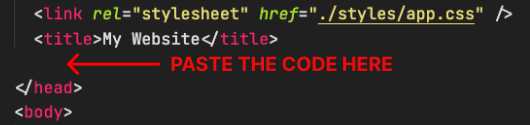
2. Fügen Sie den Code ein
Platzieren Sie den Code direkt vor dem </head>-Tag im HTML Ihrer Website