Log in
WhatsApp Business using Clientify

78 clicks
¡Widget Test automated!
sss
78 clicks
¡Widget Test automated!
sss
77 clicks
¡Widget Test automated!
sss
77 clicks
¡Widget Test automated!
sss
77 clicks
¡Widget Test automated!
sss
76 clicks
¡Widget Test automated!
sss
76 clicks
¡Widget Test automated!
sss
74 clicks
¡Widget Test automated!
sss
72 clicks
¡Widget Test automated!
sss
62 clicks
Espacio Vital Iquique
Escríbeme y te ayudo, con lo que necesites
Trainning / Sports / Yoga
61 clicks
¡Widget Test automated!
sss
60 clicks
¡Widget Test automated!
sss
Previous
1
…
27
28
29
30
(current)
31
32
33
…
58
Next
Add the widget on your website
1. Copy this code
Your widget code
Copy code
Copied to clipboard
or your Key Number (
Learn how to add your Widget to your Wordpress website
)
Copy key number
Copied to clipboard
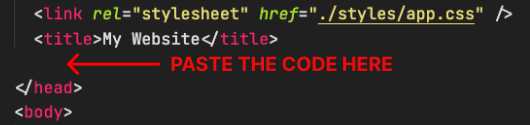
2. Paste the code
Place the code just before the </head> tag in the HTML of your website